Head to head · 33 specs differ
GL.iNet Slate AX vs Slate 7
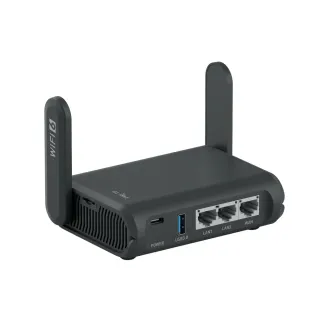 GL.iNetSlate AXWi-Fi 6 · travel router · 2022$119.99
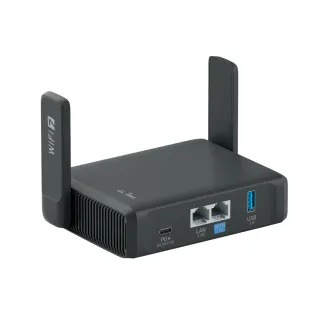 GL.iNetSlate 7Wi-Fi 7 · travel router · 2025$169.99
The short answer
Buy the Slate 7 if you will actually use the 2.5 Gbps ports — on fast hotel or fibre uplinks, or wired to a laptop — or if you want MLO, Tailscale and double the RAM for VPN headroom. Buy the Slate AX if you need a third Ethernet port or the microSD slot, both of which the Slate 7 drops, or if your uplink is gigabit anyway, in which case the $50 buys you very little you can measure.
| Specification | GL.iNetSlate AX | GL.iNetSlate 7 |
|---|---|---|
| Price | ||
| Starting price | $119.99 | $169.99 |
| Wi-Fi | ||
| Wi-Fi standard | Wi-Fi 6 | Wi-Fi 7 |
| Bands | Dual-band | Dual-band |
| Speed class | AX1800 | BE3600 |
| All bands combined | 1,800 Mbps | 3,570 Mbps |
| Available to clients | 1,800 Mbps | 3,570 Mbpshigher |
| Fastest single band | 1,200 Mbps | 2,882 Mbpshigher |
| Radios | ||
| 2.4 GHz | 600 Mbps2 streams · 40 MHz | 688 Mbpshigher2 streams · 40 MHz |
| 5 GHz | 1,200 Mbps2 streams · 80 MHz | 2,882 Mbpshigher2 streams · 160 MHz |
| Wired & ports | ||
| Internet (WAN) port | 1 Gbps | 2.5 Gbpshigher |
| 2.5 Gigabit ports | 0 | 2higher |
| Gigabit ports | 3higher | 0 |
| USB ports | 1 | 1 |
| Uplink & power | ||
| Ethernet WAN | Yes | Yes |
| Wi-Fi as WAN (repeater) | Yes | Yes |
| USB tethering | Yes | Yes |
| Processor & build | ||
| Weight | 245 g | 295 g |
| Dimensions | 125 × 82 × 36 mm | 130 × 91 × 34 mm |
| Volume | 369 | 402 |
| Processor | Qualcomm IPQ6000 quad-core @1.2 GHz | Qualcomm quad-core 1.1 GHz |
| Memory | 512 MB | 1 GBhigher |
| Storage | 128 MB | 512 MBhigher |
| Antennas | 2 | 2 |
| Features | ||
| VPN | ||
| WireGuard server | Yes | Yes |
| WireGuard client | Yes | Yes |
| OpenVPN server | Yes | Yes |
| OpenVPN client | Yes | Yes |
| Tailscale | — | Yes |
| Firmware | ||
| OpenWrt support | Yes | — |
| OpenWrt-based stock firmware | Yes | Yes |
| SSH access | Yes | Yes |
| Wi-Fi features | ||
Multi-Link Operation (MLO)What is Multi-Link Operation (MLO)?Worth comparing29 of 79 listed here A Wi-Fi 7 device uses two bands at the same time over one connection, instead of picking one and living with it. Look at instead: whether your phone and laptop are Wi-Fi 7 — nothing older can use this Full entry → | — | Yes |
OFDMAWhat is OFDMA?Table stakes50 of 79 listed here Splits a channel into smaller slices so several devices are served in the same instant instead of taking turns. Look at instead: streams per radio and channel width — those set the ceiling OFDMA divides up Full entry → | Yes | Yes |
MU-MIMOWhat is MU-MIMO?Table stakes46 of 79 listed here Lets the router hold separate conversations with several devices at once using different antenna streams. Look at instead: the stream count on each radio — a 4×4 radio has twice the streams of a 2×2 to hand out Full entry → | Yes | — |
DFS channelsWhat is DFS channels?Depends on your setup18 of 79 listed here Extra 5 GHz channels shared with weather and military radar, which the router must abandon the moment it hears one. Look at instead: whether your neighbourhood is actually congested, and whether the router lets you turn DFS off Full entry → | Yes | — |
160 MHz channelsWhat is 160 MHz channels?Table stakes47 of 79 listed here A double-width channel that roughly doubles throughput when the airwaves are clear enough to sustain it. Look at instead: whether the band has room for it — on 5 GHz that almost always means DFS Full entry → | — | Yes |
| Networking | ||
| WAN failover | — | Yes |
| QoS | — | Yes |
| Dynamic DNS | — | Yes |
| Access point mode | Yes | Yes |
| Security | ||
| WPA3 | Yes | Yes |
| DNS over HTTPS | Yes | — |
| DNS over TLS | Yes | — |
| Ad blocking | Yes | Yes |
| Device isolation | — | Yes |
| Management | ||
| Parental controls | — | Yes |
| Guest network | Yes | Yes |
| Mobile app management | Yes | Yes |
| Local web UI | Yes | Yes |
| No cloud account required | — | Yes |
| Traffic monitoring | — | Yes |
| Hardware | ||
| USB storage sharing | Yes | Yes |
| About | ||
| Type | Travel router | Travel router |
| Released | 2022 | 2025 |
— means the manufacturer doesn’t publish that figure. In the features rows it means the feature isn’t listed — not that the product lacks it. A No is an absence we checked.
What actually changed
The generational jump here is smaller than "Wi-Fi 6 to Wi-Fi 7" suggests, and larger than the radio table alone lets on. Both facts matter, in opposite directions.
The Slate 7 is not full Wi-Fi 7. It is dual-band — 2.4 GHz and 5 GHz, and that's it. No 6 GHz radio means no 320 MHz channels, because 320 MHz channels only exist in the 6 GHz band. The two headline features people associate with Wi-Fi 7 are therefore both absent, and the radio rows above show why: the Slate 7 tops out at 160 MHz, exactly like a good Wi-Fi 6E router would.
What the Slate 7 does get from Wi-Fi 7 is MLO and a much faster 5 GHz radio — 2882 Mbps against the Slate AX's 1200, which is a real 2.4× and the single biggest wireless difference between them.
The wired side is the upgrade nobody puts on the box. The Slate AX has three gigabit ports. The Slate 7 has two 2.5 Gbps ports. If you are plugging into a fast uplink, or running a wired laptop through the router, that ceiling moved from 1 Gbps to 2.5 Gbps and it is the change you are most likely to actually feel. If your uplink is a hotel's shared 100 Mbps, it changes nothing at all.
What the Slate 7 gives up
Two things, and neither is a rounding error if you happen to need it:
- A third Ethernet port. The Slate AX gives you a WAN plus two LAN. The Slate 7 gives you two ports total, so one WAN and one LAN. Anyone travelling with two wired devices notices immediately.
- The microSD slot. The Slate AX takes up to 512 GB of removable storage. The Slate 7 has no slot; it keeps the USB 3.0 port, so external storage still works, just not in a form that fits in a coin pocket.
Where the extra money really goes
Memory. The Slate AX has 512 MB of RAM and 128 MB of flash; the Slate 7 has 1 GB and 512 MB. That is the least glamorous row in the table and the one most likely to matter over the life of the device — it's the headroom for VPN tunnels, ad-blocking lists, and whatever OpenWrt packages you add.
For reference, GL.iNet documents the Slate AX at up to 550 Mbps on WireGuard and 560 Mbps on OpenVPN, which is already far beyond most travel uplinks. We don't publish a throughput figure for the Slate 7 because GL.iNet doesn't state one the same way, so treat its VPN advantage as headroom rather than a number.
The Slate 7 also adds a touchscreen, Tailscale support, and USB-C PD charging up to 18 W. The touchscreen is genuinely useful for connecting to a hotel network without opening a laptop, and genuinely not worth $50 on its own.
The honest recommendation
At gigabit or below, on a trip where you are connecting a phone and a laptop over Wi-Fi, the Slate AX from 2022 does the same job for $50 less and gives you an extra port and a card slot. It remains a good travel router.
The Slate 7 is the better buy when the ports matter — a fast wired uplink, a 2.5 GbE laptop — or when you want the RAM headroom for a heavier OpenWrt setup. Buy it for the wired ceiling and the memory, not for the "Wi-Fi 7" on the box.