Head to head · 28 specs differ
TP-Link Archer BE550 vs Netgear Nighthawk RS300
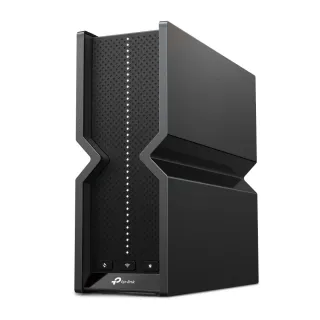
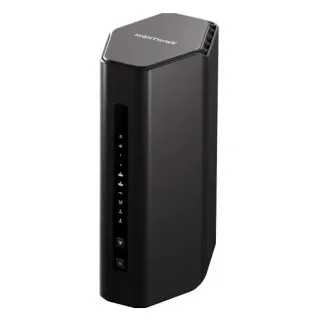
The short answer
Buy the Archer BE550. It costs $50 less, gives you five 2.5 Gbps ports instead of three, and does considerably more in software — OpenVPN, VLANs, QoS, EasyMesh and a local web UI, none of which the RS300 offers. The Nighthawk RS300 is the better buy only if you specifically want link aggregation, USB storage sharing, or you are already invested in Netgear's app and want to stay there. On wireless performance there is nothing to choose between them.
| Specification | TP-LinkArcher BE550 | NetgearNighthawk RS300 |
|---|---|---|
| Price | ||
| Starting price | $249.99 | $299.99 |
| Wi-Fi | ||
| Wi-Fi standard | Wi-Fi 7 | Wi-Fi 7 |
| Bands | Tri-band | Tri-band |
| Speed class | BE9300 | BE9300 |
| All bands combined | 9,214 Mbps | 9,335 Mbps |
| Available to clients | 9,214 Mbps | 9,335 Mbps |
| Fastest single band | 5,760 Mbps | 5,765 Mbps |
| Radios | ||
| 2.4 GHz | 574 Mbps2 streams · 40 MHz | 688 Mbpshigher2 streams · 40 MHz |
| 5 GHz | 2,880 Mbps2 streams · 160 MHz | 2,882 Mbps2 streams · 160 MHz |
| 6 GHz | 5,760 Mbps2 streams · 320 MHz | 5,765 Mbps2 streams · 320 MHz |
| Wired & ports | ||
| Internet (WAN) port | 2.5 Gbps | 2.5 Gbps |
| 2.5 Gigabit ports | 5higher | 3 |
| Gigabit ports | 0 | 2higher |
| USB ports | 1 | 1 |
| Uplink & power | ||
| Ethernet WAN | Yes | Yes |
| Processor & build | ||
| Weight | — | 950 g |
| Dimensions | 76 × 231.7 × 203 mm | 249 × 150 × 101.6 mm |
| Volume | 3,575 | 3,795 |
| Processor | — | Quad-core 2.0 GHz |
| Memory | — | 2 GB |
| Storage | — | 512 MB |
| Antennas | 6 | 4 |
| Features | ||
| VPN | ||
| OpenVPN server | Yes | — |
| OpenVPN client | Yes | — |
| Firmware | ||
| Automatic firmware updates | — | Yes |
| Wi-Fi features | ||
Multi-Link Operation (MLO)What is Multi-Link Operation (MLO)?Worth comparing29 of 79 listed here A Wi-Fi 7 device uses two bands at the same time over one connection, instead of picking one and living with it. Look at instead: whether your phone and laptop are Wi-Fi 7 — nothing older can use this Full entry → | Yes | — |
OFDMAWhat is OFDMA?Table stakes50 of 79 listed here Splits a channel into smaller slices so several devices are served in the same instant instead of taking turns. Look at instead: streams per radio and channel width — those set the ceiling OFDMA divides up Full entry → | Yes | Yes |
MU-MIMOWhat is MU-MIMO?Table stakes46 of 79 listed here Lets the router hold separate conversations with several devices at once using different antenna streams. Look at instead: the stream count on each radio — a 4×4 radio has twice the streams of a 2×2 to hand out Full entry → | Yes | Yes |
BeamformingWhat is Beamforming?Table stakes37 of 79 listed here Shapes the signal toward where a device actually is, rather than radiating evenly in every direction like a bare bulb. Look at instead: where you physically put the router — placement beats every antenna trick on this list Full entry → | Yes | — |
DFS channelsWhat is DFS channels?Depends on your setup18 of 79 listed here Extra 5 GHz channels shared with weather and military radar, which the router must abandon the moment it hears one. Look at instead: whether your neighbourhood is actually congested, and whether the router lets you turn DFS off Full entry → | Yes | — |
320 MHz channelsWhat is 320 MHz channels?Worth comparing23 of 79 listed here Wi-Fi 7's double-again channel width, available only on 6 GHz, where there is finally enough spectrum to fit it. Look at instead: whether you own 6 GHz devices, and whether they will be in the same room as the router Full entry → | Yes | Yes |
EasyMeshWhat is EasyMesh?Depends on your setup8 of 79 listed here An industry standard for mesh, so nodes from different brands can form one network instead of locking you to one vendor. Look at instead: whether you will genuinely mix brands — most people buy a matched kit and never revisit it Full entry → | Yes | — |
| Networking | ||
| Link aggregation | — | Yes |
| VLAN support | Yes | — |
| QoS | Yes | — |
| Dynamic DNS | Yes | — |
| Access point mode | Yes | — |
| Security | ||
| WPA3 | Yes | Yes |
| Built-in threat protection | Yes | Yes |
| Management | ||
| Parental controls | Yes | — |
| Guest network | Yes | Yes |
| Mobile app management | Yes | Yes |
| Local web UI | Yes | — |
| Traffic monitoring | — | Yes |
| Hardware | ||
| USB storage sharing | — | Yes |
| About | ||
| Type | Router | Router |
| Released | 2024 | — |
— means the manufacturer doesn’t publish that figure. In the features rows it means the feature isn’t listed — not that the product lacks it. A No is an absence we checked.
The radios are the same. Really.
Both of these are BE9300 tri-band Wi-Fi 7 routers, and if you put their radio specs side by side the differences are inside the margin of measurement error:
- 5 GHz: 2880 Mbps against 2882 Mbps — a gap of 0.07%
- 6 GHz: 5760 Mbps against 5765 Mbps — a gap of 0.09%
- Total: 9214 Mbps against 9335 Mbps — a gap of 1.3%
Those are the same numbers. Two Mbps on a 2882 Mbps link is not a difference you could detect with instruments, let alone notice. The table above deliberately does not flag them as differences or mark one as higher, because presenting a 0.07% gap as a reason to choose a router would be dishonest.
The one radio difference with any substance is 2.4 GHz: 574 Mbps on the BE550 against 688 on the RS300, about 17%. That is the band you use for smart plugs and range, not throughput, so it is the least consequential 17% on the page.
Both run 320 MHz channels on 6 GHz. Both have a 2.5 Gbps WAN port. Both are 2×2 on every band. If you are choosing between these two on wireless performance, you are choosing on noise.
What actually differs: the ports
The Archer BE550 has five 2.5 Gbps ports. The Nighthawk RS300 has three 2.5 Gbps ports plus two gigabit ports.
One of each router's multi-gig ports goes to your modem, so what you really have is four 2.5 Gbps LAN ports against two. If you run wired devices — a NAS, a desktop, a switch feeding another room — that is the single most concrete difference between these routers, and it does not appear in either product's marketing name.
The RS300 does offer link aggregation, which the BE550 does not. If you have a NAS that supports bonding, that partly closes the gap.
What actually differs: the software
This is lopsided, with one caveat worth stating plainly: our catalog records what a manufacturer documents, and TP-Link documents the Archer BE550 far more thoroughly than Netgear documents the RS300. Nineteen tracked features against eleven partly reflects that. Blanks in the features rows mean "not listed", not "absent" — the legend under the table says so, and some of them (beamforming, DFS) are near-universal on this class of hardware.
The differences that are not documentation artefacts:
- OpenVPN server and client. TP-Link lists both; Netgear lists no VPN server for the RS300. If dialling back into your home network matters, check this one yourself before buying the Netgear.
- VLAN support and QoS — meaningful if you segment IoT devices or shape traffic.
- EasyMesh — the BE550 can be extended with any EasyMesh-compatible node. Reviewers consistently note the RS300 has no mesh mode, which for a router you might want to extend later is the most consequential item here.
- A local web UI — you can administer the BE550 from a browser on your own network. The RS300 is app-first.
- Parental controls.
The RS300 answers with link aggregation, USB storage sharing, traffic monitoring, and automatic firmware updates. Shorter, but not nothing — and link aggregation in particular is a genuine capability the BE550 lacks.
Where the RS300's money went
Into the hardware you can't see. Netgear specifies a 2.0 GHz quad-core CPU with 2 GB of RAM and 512 MB of flash — considerably more headroom than this class of router usually carries, and more than TP-Link publishes for the BE550 at all. Whether that headroom ever becomes performance you notice is a different question, and nothing in the specs answers it.
It is also physically the larger, heavier device at 950 g, with a four-antenna design against the BE550's six.
The honest recommendation
The Archer BE550 is the better router for most people buying in this class, and it is also the cheaper one, which is not the usual shape of these comparisons. More usable multi-gig ports, a much longer feature list, mesh expandability, and a local web UI, for $50 less.
Choose the Nighthawk RS300 when one of its specific advantages is the thing you need — link aggregation to a NAS, USB storage sharing, or a Netgear setup you already run. Do not choose it expecting faster Wi-Fi. On that question these two routers are the same product.