Head to head · 31 specs differ
TP-Link Deco BE85 vs Netgear Orbi 970 Series
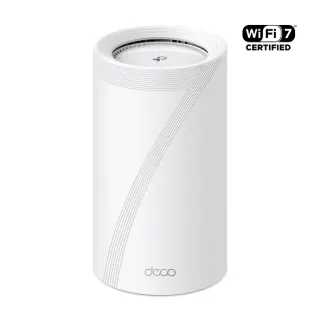 TP-LinkDeco BE85Wi-Fi 7 · mesh system · 2023from $599.99
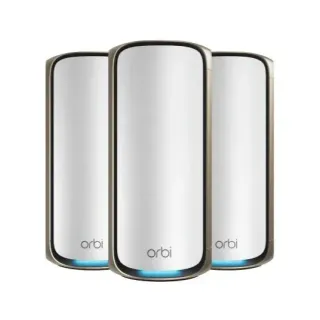 NetgearOrbi 970 SeriesWi-Fi 7 · mesh system · 2023from $799.99
The short answer
Buy the Deco BE85 unless you are running the mesh wirelessly over a long or awkward hop. Its client-facing radios are identical to the Orbi's, it rates higher coverage per unit, it adds an SFP+ port and USB, and at the 3-pack it costs $500 less. The Orbi 970 Series is worth its premium in one specific case: a dedicated second 5 GHz radio reserved for router-to-satellite traffic, which is genuinely the better architecture when you cannot run Ethernet between units. If you can run Ethernet, you are paying for a radio you have just made redundant.
| Specification | TP-LinkDeco BE85 | NetgearOrbi 970 Series |
|---|---|---|
| Price | ||
| 1-pack | $599.99 | $799.99 |
| 2-pack | $1,099.99 | $1,499.99 |
| 3-pack | $1,499.99 | $1,999.99 |
| Coverage, 1-pack | 3,600 sqfthigher | 3,300 sqft |
| Coverage, 2-pack | 7,200 sqfthigher | 6,600 sqft |
| Coverage, 3-pack | 10,800 sqfthigher | 10,000 sqft |
| Wi-Fi | ||
| Wi-Fi standard | Wi-Fi 7 | Wi-Fi 7 |
| Bands | Tri-band | Quad-band |
| Speed class | BE22000 | BE27000 |
| All bands combined | 21,536 Mbps | 27,089 Mbps |
| Available to clients | 21,536 Mbpshigher | 18,442 Mbps |
| Fastest single band | 11,520 Mbps | 11,530 Mbps |
| Radios | ||
| 2.4 GHz | 1,376 Mbpshigher4 streams · 40 MHz | 1,147 Mbps4 streams · 40 MHz |
| 5 GHz | 8,640 Mbps4 streams · 240 MHz | 8,647 Mbpsbackhaul only · 4 streams · 240 MHz |
| 5 GHz (2) | — | 5,765 Mbps4 streams · 160 MHz |
| 6 GHz | 11,520 Mbps4 streams · 320 MHz | 11,530 Mbpsclients + backhaul · 4 streams · 320 MHz |
| Wired & ports | ||
| Internet (WAN) port | 10 Gbps | 10 Gbps |
| 10 Gigabit ports | 2 | 2 |
| 2.5 Gigabit ports | 2 | 4higher |
| USB ports | 1higher | 0 |
| Uplink & power | ||
| Ethernet WAN | Yes | Yes |
| Processor & build | ||
| Weight | — | 1,790 g |
| Dimensions | — | 294.03 × 144.38 × 130.79 mm |
| Volume | — | 5,552 |
| Processor | Quad-core 2.2 GHz | Quad-core 2.2 GHz |
| Memory | — | 2 GB |
| Storage | — | 4 GB |
| Features | ||
| Firmware | ||
| Automatic firmware updates | Yes | Yes |
| Wi-Fi features | ||
Multi-Link Operation (MLO)What is Multi-Link Operation (MLO)?Worth comparing29 of 79 listed here A Wi-Fi 7 device uses two bands at the same time over one connection, instead of picking one and living with it. Look at instead: whether your phone and laptop are Wi-Fi 7 — nothing older can use this Full entry → | Yes | Yes |
OFDMAWhat is OFDMA?Table stakes50 of 79 listed here Splits a channel into smaller slices so several devices are served in the same instant instead of taking turns. Look at instead: streams per radio and channel width — those set the ceiling OFDMA divides up Full entry → | Yes | — |
MU-MIMOWhat is MU-MIMO?Table stakes46 of 79 listed here Lets the router hold separate conversations with several devices at once using different antenna streams. Look at instead: the stream count on each radio — a 4×4 radio has twice the streams of a 2×2 to hand out Full entry → | Yes | — |
BeamformingWhat is Beamforming?Table stakes37 of 79 listed here Shapes the signal toward where a device actually is, rather than radiating evenly in every direction like a bare bulb. Look at instead: where you physically put the router — placement beats every antenna trick on this list Full entry → | Yes | — |
Band steeringWhat is Band steering?Depends on your setup16 of 79 listed here Nudges a device onto the faster band when it would otherwise settle on the slow one and stay there. Look at instead: whether the router lets you split the bands into separate networks — some devices need that Full entry → | Yes | — |
DFS channelsWhat is DFS channels?Depends on your setup18 of 79 listed here Extra 5 GHz channels shared with weather and military radar, which the router must abandon the moment it hears one. Look at instead: whether your neighbourhood is actually congested, and whether the router lets you turn DFS off Full entry → | Yes | — |
160 MHz channelsWhat is 160 MHz channels?Table stakes47 of 79 listed here A double-width channel that roughly doubles throughput when the airwaves are clear enough to sustain it. Look at instead: whether the band has room for it — on 5 GHz that almost always means DFS Full entry → | Yes | Yes |
320 MHz channelsWhat is 320 MHz channels?Worth comparing23 of 79 listed here Wi-Fi 7's double-again channel width, available only on 6 GHz, where there is finally enough spectrum to fit it. Look at instead: whether you own 6 GHz devices, and whether they will be in the same room as the router Full entry → | Yes | Yes |
Dedicated wireless backhaulWhat is Dedicated wireless backhaul?Worth comparing3 of 79 listed here A radio reserved for traffic between mesh nodes, so your devices are not sharing airtime with the mesh itself. Look at instead: whether you can run Ethernet between the nodes — wired backhaul beats every wireless arrangement Full entry → | — | Yes |
| Networking | ||
| QoS | Yes | — |
| Dynamic DNS | — | Yes |
| Access point mode | Yes | Yes |
| Wired backhaul | Yes | Yes |
| Security | ||
| WPA3 | Yes | Yes |
| Built-in threat protection | Yes | Yes |
| Management | ||
| Parental controls | Yes | Yes |
| Guest network | Yes | Yes |
| Mobile app management | Yes | Yes |
| Local web UI | — | Yes |
| Traffic monitoring | Yes | — |
| Hardware | ||
| SFP+ port | Yes | — |
| Fanless | — | Yes |
| About | ||
| Type | Mesh system | Mesh system |
| Released | 2023 | 2023 |
— means the manufacturer doesn’t publish that figure. In the features rows it means the feature isn’t listed — not that the product lacks it. A No is an absence we checked.
BE27000 vs BE22000 is not a 5,500 Mbps advantage
The Orbi 970 Series is quad-band and the Deco BE85 is tri-band, and that is the whole of the difference in the headline rating. Look at what the bands actually are:
| Deco BE85 | Orbi 970 | |
|---|---|---|
| 2.4 GHz | 1376 Mbps | 1147 Mbps |
| 5 GHz | 8640 Mbps | 8647 Mbps |
| 5 GHz (second) | — | 5765 Mbps |
| 6 GHz | 11520 Mbps | 11530 Mbps |
The primary 5 GHz radios are 8640 against 8647 — a gap of 0.08%. The 6 GHz radios are 11520 against 11530 — 0.09%. Those are the same radios. The table above does not mark either as higher, because at that margin neither is.
The Orbi's entire numerical advantage is that second 5 GHz radio, and it is not a radio your laptop can connect to. It is reserved as a dedicated wireless backhaul, carrying traffic between the router and its satellites so that link does not have to share airtime with your devices.
That is a real and worthwhile piece of engineering. It is not 5,500 Mbps of extra speed for your phone, which is how the BE27000 label reads.
When the dedicated backhaul is worth $500
It matters most when the wireless hop between units is doing hard work — a long run, a floor in between, thick walls. On a tri-band system like the Deco BE85, that satellite link competes with your clients for the same 5 GHz and 6 GHz airtime; on the Orbi it has a lane to itself.
It matters not at all if you run wired backhaul. Both systems support it, and Ethernet between units beats any wireless backhaul, dedicated or not. If your units will sit near Ethernet drops, the Orbi's headline feature is one you have deliberately switched off.
Coverage, and a result that goes the other way
TP-Link rates the Deco BE85 higher per unit than Netgear rates the Orbi:
- 1-pack: 3,600 sq ft against 3,300
- 2-pack: 7,200 sq ft against 6,600
- 3-pack: 10,800 sq ft against 10,000
These are manufacturer claims, and manufacturer coverage claims are optimistic across the board — but they are the numbers each vendor is willing to stand behind, and the cheaper system claims more of it.
Ports
Both give you a 10 Gbps WAN port and two 10 Gbps ports per unit. After that they diverge:
- The Orbi has four 2.5 Gbps ports against the Deco's two, so it is the better wired hub if you have a lot of multi-gig devices at the main unit. Note that its satellites carry no WAN port — one 10G LAN and two 2.5G LAN.
- The Deco BE85 has an SFP+ port, which the Orbi does not. If you have fibre coming into the house, that is a direct connection rather than a media converter sitting on a shelf.
- The Deco has a USB port; the Orbi has none at all.
Software
A caveat before the list: TP-Link and Netgear document their products very differently, and this catalog records what a manufacturer states rather than what we assume. TP-Link's spec sheet enumerates capabilities Netgear's does not — MU-MIMO and OFDMA among them. That is a documentation difference, and it is not evidence the Orbi lacks either one. Read a blank in the features rows as "not listed", which is what the legend under the table says.
It is worth resisting the urge to fill those blanks in from the standard. eero, for instance, specifies its Wi-Fi 7 units as "SU-MIMO" rather than "MU/SU-MIMO" the way it did for its Wi-Fi 6 line — so "every Wi-Fi 7 product obviously does MU-MIMO" is exactly the sort of assumption that turns out to be wrong.
Where the difference is real, it is about how you administer the thing. The Orbi has a local web UI; the Deco is app-only. If you would rather not run your network through a phone, that is a live consideration for a system you will own for years. The Orbi also lists dynamic DNS and is fanless.
The Deco's side of the ledger is QoS and traffic monitoring, neither of which Netgear lists for the Orbi.
Both require an account and an app for setup, both have automatic firmware updates, and both put their security features behind a subscription — TP-Link HomeShield and Netgear Armor respectively. Budget for that if you want the threat protection either one advertises.
The price, at the size people actually buy
- 1-pack: $599.99 against $799.99 — $200 apart
- 2-pack: $1,099.99 against $1,499.99 — $400 apart
- 3-pack: $1,499.99 against $1,999.99 — $500 apart
Both of these are expensive systems and the gap widens with every unit. At the 3-pack, $500 is most of the price of a fourth Deco unit.
The honest recommendation
For most homes the Deco BE85 is the better buy: the same client radios, more claimed coverage, an SFP+ port, USB, and $500 less at the size most people choose.
The Orbi 970 Series earns its premium when the backhaul is the hard part of the problem — units far apart, no Ethernet between them, and a satellite link that would otherwise be fighting your clients for airtime. Buy it for that architecture, and only for that. If you are pulling Ethernet to each unit, buy the Deco and spend the difference on the cable.