Head to head · 10 specs differ
Netgear Nighthawk RS600 vs RS700S
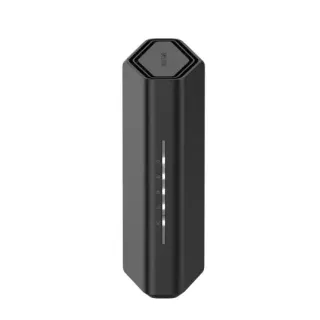
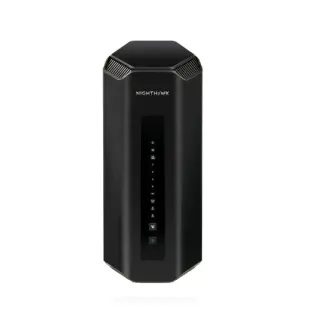
The short answer
Buy the RS600. The 5 GHz radio, the 6 GHz radio, the 10 Gig WAN, the second 10 Gig port and every listed feature are identical between these two. What the extra $100 buys is a four-stream 2.4 GHz radio instead of a two-stream one, a 2.6 GHz CPU instead of 2.0, one more gigabit LAN port, and Netgear's rating moving from 150 devices to 200. The RS700S is the better router, but 2.4 GHz is where smart plugs and door sensors live, not where throughput comes from, so doubling its ceiling is the least useful place in the house to spend $100. Buy the RS700S if you are actually near the RS600's 150-device rating and most of those devices are 2.4 GHz — a large smart-home install is the one case where the extra streams and the faster CPU do real work.
| Specification | NetgearNighthawk RS600 | NetgearNighthawk RS700S |
|---|---|---|
| Price | ||
| Starting price | $499.99 | $599.99 |
| Wi-Fi | ||
| Wi-Fi standard | Wi-Fi 7 | Wi-Fi 7 |
| Bands | Tri-band | Tri-band |
| Speed class | BE18000 | BE19000 |
| All bands combined | 17,981 Mbps | 18,669 Mbps |
| Available to clients | 17,981 Mbps | 18,669 Mbpshigher |
| Fastest single band | 11,529 Mbps | 11,529 Mbps |
| Radios | ||
| 2.4 GHz | 688 Mbps2 streams · 40 MHz | 1,376 Mbpshigher4 streams · 40 MHz |
| 5 GHz | 5,764 Mbps4 streams · 160 MHz | 5,764 Mbps4 streams · 160 MHz |
| 6 GHz | 11,529 Mbps4 streams · 320 MHz | 11,529 Mbps4 streams · 320 MHz |
| Wired & ports | ||
| Internet (WAN) port | 10 Gbps | 10 Gbps |
| 10 Gigabit ports | 2 | 2 |
| Gigabit ports | 3 | 4higher |
| USB ports | 1 | 1 |
| Uplink & power | ||
| Ethernet WAN | Yes | Yes |
| Processor & build | ||
| Weight | 1,240 g | 1,635 g |
| Dimensions | 257.5 × 150 × 101.6 mm | 281.7 × 124.03 × 142 mm |
| Volume | 3,924 | 4,961 |
| Processor | Quad-core 2.0 GHz | Quad-core 2.6 GHz |
| Antennas | 8 | 8 |
| Features | ||
| Firmware | ||
| Automatic firmware updates | Yes | Yes |
| Wi-Fi features | ||
OFDMAWhat is OFDMA?Table stakes50 of 79 listed here Splits a channel into smaller slices so several devices are served in the same instant instead of taking turns. Look at instead: streams per radio and channel width — those set the ceiling OFDMA divides up Full entry → | Yes | Yes |
MU-MIMOWhat is MU-MIMO?Table stakes46 of 79 listed here Lets the router hold separate conversations with several devices at once using different antenna streams. Look at instead: the stream count on each radio — a 4×4 radio has twice the streams of a 2×2 to hand out Full entry → | Yes | Yes |
320 MHz channelsWhat is 320 MHz channels?Worth comparing23 of 79 listed here Wi-Fi 7's double-again channel width, available only on 6 GHz, where there is finally enough spectrum to fit it. Look at instead: whether you own 6 GHz devices, and whether they will be in the same room as the router Full entry → | Yes | Yes |
| Networking | ||
| Link aggregation | Yes | Yes |
| Security | ||
| WPA3 | Yes | Yes |
| Built-in threat protection | Yes | Yes |
| Management | ||
| Guest network | Yes | Yes |
| Mobile app management | Yes | Yes |
| Traffic monitoring | Yes | Yes |
| Hardware | ||
| USB storage sharing | Yes | Yes |
| About | ||
| Type | Router | Router |
What is identical
Start here, because it is most of the router.
- The 5 GHz radio: four-stream, 5764 Mbps, on both.
- The 6 GHz radio: four-stream, 11529 Mbps, on both. This is the fastest radio either router has and the reason you would buy at this tier at all.
- The 10 Gig WAN port, and a second 10 Gig port for LAN. Both.
- The USB 3.0 port. Both.
- Every feature in the table below: MU-MIMO, OFDMA, 320 MHz channels, link aggregation, WPA3, traffic monitoring, USB storage sharing, app management. Identical lists, not merely similar ones.
- Eight antennas. Both.
If you are buying for Wi-Fi speed, these are the same router. The BE18000 and BE19000 badges differ by about 4%, and all of that 4% is on the slowest band.
The difference is a 2.4 GHz radio
The RS700S runs four streams on 2.4 GHz where the RS600 runs two: 1376 Mbps against 688. That is the entire wireless gap.
2.4 GHz is the band with the best range and the worst throughput, and in a modern house it carries the things that need neither — smart plugs, sensors, thermostats, older cameras. A device that sips a few kilobits an hour does not care that the ceiling above it doubled. Anything that actually moves data is on 5 GHz or 6 GHz, where these two routers are the same.
There is one real case where the extra streams matter, and it is not speed. A four-stream radio can serve more 2.4 GHz devices at once through MU-MIMO, which is about airtime rather than throughput. If you have dozens of 2.4 GHz smart-home devices competing for the same band, the RS700S handles that contention better. Netgear's own ratings line up with that reading: 150 connected devices for the RS600 and 200 for the RS700S.
The CPU and the port
The RS700S has a quad-core 2.6 GHz processor to the RS600's 2.0 GHz. Router CPUs matter for NAT at high throughput, for VPN, and for tracking a lot of simultaneous clients — the same reason the device rating is higher. On a 10 Gig WAN that headroom is not pointless. It is also not something most homes will reach, because very few residential connections come close to saturating either chip.
The RS700S also has four gigabit LAN ports to the RS600's three. Both have the same two 10 Gig ports, so this is the fourth slow port, not a fourth fast one. It matters if you are plugging in one more printer, and not otherwise.
Coverage claims move from 3,300 to 3,500 sq ft — about 6%, which is inside the range where a wall in the wrong place matters more than the router.
The honest recommendation
The RS700S is the better router on every row where they differ. That is not the question. The question is whether those rows are worth $100, and for almost everybody they are not, because the rows that would justify it — the 5 GHz radio, the 6 GHz radio, the 10 Gig ports — are already identical.
Buy the RS600 and put the $100 toward a mesh node, a 10 Gig switch, or nothing at all. Buy the RS700S when your device count is genuinely near the RS600's rating and the bulk of it is 2.4 GHz smart-home hardware, because that is the one scenario the extra streams and the faster CPU were built for.
If you are choosing between these two on the strength of BE19000 against BE18000, you are paying for a number that describes the band you use least.