Head to head · 14 specs differ
GL.iNet Slate 7 vs Slate 7 Pro
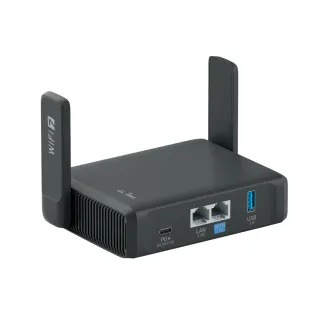 GL.iNetSlate 7Wi-Fi 7 · travel router · 2025$169.99
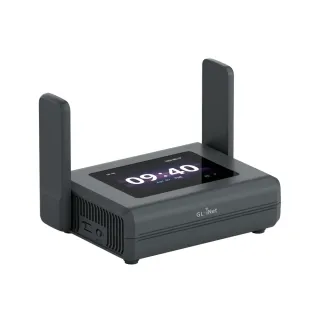 GL.iNetSlate 7 ProWi-Fi 7 · travel router · 2026$239.99
The short answer
Buy the Slate 7 Pro if you actually route your traffic through a VPN. GL.iNet's own figures put it at 1100 Mbps on WireGuard against the Slate 7's 490, and 1000 Mbps on OpenVPN-DCO against 385 — the MediaTek 2.0 GHz CPU doing work the Qualcomm 1.1 GHz cannot. That is $70 for more than double the throughput on the job a travel router mostly exists to do. Buy the Slate 7 if you don't run a VPN, or if the tunnel you run is nowhere near 490 Mbps anyway, which covers most home upload links. The two are otherwise close to the same router: identical 2.4 and 5 GHz radios, the same pair of 2.5 Gbps ports, the same RAM and flash, and 33 g apart. The tri-band badge is the headline difference and the weakest reason to pay for it.
| Specification | GL.iNetSlate 7 | GL.iNetSlate 7 Pro |
|---|---|---|
| Price | ||
| Starting price | $169.99 | $239.99 |
| Wi-Fi | ||
| Wi-Fi standard | Wi-Fi 7 | Wi-Fi 7 |
| Bands | Dual-band | Tri-band |
| Speed class | BE3600 | BE10000 |
| All bands combined | 3,570 Mbps | 9,334 Mbps |
| Available to clients | 3,570 Mbps | 9,334 Mbpshigher |
| Fastest single band | 2,882 Mbps | 5,764 Mbpshigher |
| Radios | ||
| 2.4 GHz | 688 Mbps2 streams · 40 MHz | 688 Mbps2 streams · 40 MHz |
| 5 GHz | 2,882 Mbps2 streams · 160 MHz | 2,882 Mbps2 streams · 160 MHz |
| 6 GHz | — | 5,764 Mbps2 streams · 320 MHz |
| Wired & ports | ||
| Internet (WAN) port | 2.5 Gbps | 2.5 Gbps |
| 2.5 Gigabit ports | 2 | 2 |
| USB ports | 1 | 1 |
| Uplink & power | ||
| Ethernet WAN | Yes | Yes |
| Wi-Fi as WAN (repeater) | Yes | Yes |
| USB tethering | Yes | Yes |
| Processor & build | ||
| Weight | 295 g | 328 g |
| Dimensions | 130 × 91 × 34 mm | 130 × 91 × 36 mm |
| Volume | 402 | 426 |
| Processor | Qualcomm quad-core 1.1 GHz | MediaTek quad-core 2.0 GHz |
| Memory | 1 GB | 1 GB |
| Storage | 512 MB | 512 MB |
| Antennas | 2 | 2 |
| Features | ||
| VPN | ||
| WireGuard server | Yes | Yes |
| WireGuard client | Yes | Yes |
| OpenVPN server | Yes | Yes |
| OpenVPN client | Yes | Yes |
| Tailscale | Yes | Yes |
| Firmware | ||
| OpenWrt-based stock firmware | Yes | Yes |
| SSH access | Yes | Yes |
| Wi-Fi features | ||
Multi-Link Operation (MLO)What is Multi-Link Operation (MLO)?Worth comparing29 of 79 listed here A Wi-Fi 7 device uses two bands at the same time over one connection, instead of picking one and living with it. Look at instead: whether your phone and laptop are Wi-Fi 7 — nothing older can use this Full entry → | Yes | Yes |
OFDMAWhat is OFDMA?Table stakes50 of 79 listed here Splits a channel into smaller slices so several devices are served in the same instant instead of taking turns. Look at instead: streams per radio and channel width — those set the ceiling OFDMA divides up Full entry → | Yes | — |
160 MHz channelsWhat is 160 MHz channels?Table stakes47 of 79 listed here A double-width channel that roughly doubles throughput when the airwaves are clear enough to sustain it. Look at instead: whether the band has room for it — on 5 GHz that almost always means DFS Full entry → | Yes | Yes |
320 MHz channelsWhat is 320 MHz channels?Worth comparing23 of 79 listed here Wi-Fi 7's double-again channel width, available only on 6 GHz, where there is finally enough spectrum to fit it. Look at instead: whether you own 6 GHz devices, and whether they will be in the same room as the router Full entry → | — | Yes |
| Networking | ||
| WAN failover | Yes | Yes |
| QoS | Yes | Yes |
| Dynamic DNS | Yes | Yes |
| Access point mode | Yes | Yes |
| Security | ||
| WPA3 | Yes | Yes |
| Ad blocking | Yes | Yes |
| Device isolation | Yes | Yes |
| Management | ||
| Parental controls | Yes | Yes |
| Guest network | Yes | Yes |
| Mobile app management | Yes | Yes |
| Local web UI | Yes | Yes |
| No cloud account required | Yes | Yes |
| Traffic monitoring | Yes | Yes |
| Hardware | ||
| USB storage sharing | Yes | Yes |
| About | ||
| Type | Travel router | Travel router |
| Released | 2025 | 2026 |
— means the manufacturer doesn’t publish that figure. In the features rows it means the feature isn’t listed — not that the product lacks it. A No is an absence we checked.
The wireless upgrade is not the upgrade
BE3600 against BE10000 reads like a generational leap. Most of it is one radio.
The 2.4 GHz radios are both 688 Mbps. The 5 GHz radios are both 2882 Mbps. Not close — the same numbers, because these are the same radios. Every Mbps of the gap between 3570 and 9334 is the 6 GHz radio the Pro adds and the Slate 7 does not have, plus the 320 MHz channels that come with it.
A 6 GHz radio is worth real money on a home router. On a travel router it is the least useful radio you can add, because of what a travel router is doing: sitting between you and somebody else's network. In a hotel, an apartment, or a conference hall, your uplink is their Wi-Fi or their Ethernet drop, and that uplink caps you far below what either of these routers can already do on 5 GHz. A radio that can move 5764 Mbps to your laptop does not make a 60 Mbps hotel connection faster.
Where the 6 GHz radio does earn its place is congestion. Hotels and conference centres are exactly the places where 2.4 and 5 GHz are saturated, and 6 GHz is still comparatively empty. If you have several devices behind the router, or you move large files between your own devices over the router's LAN rather than out through the uplink, that is a genuine benefit. It is just not the "twice as fast" the model numbers suggest.
What $70 actually buys: VPN throughput
This is the difference that decides it, and it does not appear in either product's name.
| Slate 7 | Slate 7 Pro | |
|---|---|---|
| WireGuard | 490 Mbps | 1100 Mbps |
| OpenVPN-DCO | 385 Mbps | 1000 Mbps |
Those are GL.iNet's own numbers, measured in client mode on a local network, and both routers' figures come with the same caveat: running the device as a VPN server is slower than running it as a client. Treat them as a ratio rather than a promise, and the ratio is 2.2× on WireGuard and 2.6× on OpenVPN.
The cause is in the hardware table: a MediaTek quad-core at 2.0 GHz against a Qualcomm quad-core at 1.1 GHz. VPN throughput on a small router is a CPU-bound problem — encryption per packet — which is why nearly doubling the clock nearly doubles the tunnel.
For a travel router this is the spec that matters most. The reason to carry one is usually to put your own network between you and a network you don't trust, and that means everything you do runs through the tunnel. If you are moving data at any speed, the Slate 7's 490 Mbps ceiling is the first wall you hit, and the Pro's is more than twice as far away.
The honest counterweight: 490 Mbps is already more than most people can saturate. If you connect back to a home WireGuard server, your home upload speed is the real ceiling, and on most residential links that number is well under 100 Mbps. In that case you are paying $70 for headroom you will never reach.
What is identical
Worth stating plainly, because the model names imply otherwise:
- Both have two 2.5 Gbps Ethernet ports and a 2500 Mbps WAN.
- Both have 1 GB of RAM and 512 MB of flash.
- Both have one USB 3.0 port and two antennas.
- Both are 130 × 91 mm, differing by 2 mm in height and 33 g in weight — 295 g against 328 g. In a bag, that is nothing.
- Both run GL.iNet's OpenWrt-based firmware with the same admin panel, WireGuard and OpenVPN in both directions, Tailscale, AdGuard-based ad blocking, and a touchscreen.
If you are choosing on ports, storage, size, or software, you are choosing on nothing. These are the same router with a different radio and a different CPU.
Two blank cells that are not absences
The features table shows OFDMA listed for the Slate 7 and blank for the Slate 7 Pro. Read that as "GL.iNet doesn't state it for the Pro", not as a capability the newer, more expensive router dropped. OFDMA is part of the Wi-Fi 6 and Wi-Fi 7 specifications that the Pro is certified against, and the blank is a gap in what the manufacturer published for a product that launched recently, not a design decision. If OFDMA specifically matters to you, ask GL.iNet before you buy rather than reading the gap as an answer.
This catalog records what a manufacturer documents. An empty cell means nobody found the claim, which is not the same as the product lacking the feature — the legend under the table says so, and it applies here more than usual because one of these two products is several months old and the other is not.
Which one to buy
Take the Slate 7 Pro if a VPN is why you own a travel router and you have the upstream bandwidth to notice the difference — a fast hotel or office connection, a commercial VPN endpoint rather than a home server, or a home link with real upload speed behind it. The 6 GHz radio is then a bonus that helps most in the crowded places you are most likely to use it.
Take the Slate 7 if your VPN runs back to a home connection uploading at double digits, or if you mostly want a trusted network in a hotel room and not a throughput record. You get the same ports, the same storage, the same firmware and the same 5 GHz performance for $70 less, and the ceiling you are giving up is one you were never going to reach.
Neither is a bad buy at its price. The mistake is paying the Pro's premium for the tri-band badge, which is the part of the upgrade that does the least on the kind of network a travel router actually lives on.