Head to head · 20 specs differ
Ubiquiti UniFi Express 7 vs Dream Router 7
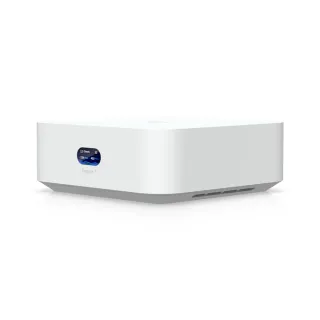
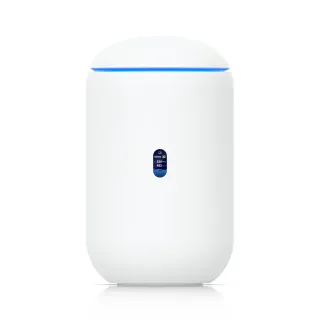
The short answer
Buy the Dream Router 7 unless you are certain you will never plug anything in. The Wi-Fi on these two is not similar, it is the same: the same three radios at the same speeds, the same quad-core CPU, the same 3 GB of RAM, the same 10 Gig WAN port and the same 2300 Mbps IDS/IPS throughput. What $80 buys is everything around the radios — four 2.5 Gbps ports instead of one, PoE output to power a camera or an access point, an SFP+ cage, a microSD slot, and a considerably longer software list including SSH, a local web UI and dual WAN. Buy the UniFi Express 7 if you want the smallest, cheapest way into UniFi and your devices are wireless. Nobody should choose between these two on Wi-Fi performance, because there is no difference to choose on.
| Specification | UbiquitiUniFi Express 7 | UbiquitiDream Router 7 |
|---|---|---|
| Price | ||
| Starting price | $199.00 | $279.00 |
| Wi-Fi | ||
| Wi-Fi standard | Wi-Fi 7 | Wi-Fi 7 |
| Bands | Tri-band | Tri-band |
| All bands combined | 10,688 Mbps | 10,688 Mbps |
| Available to clients | 10,688 Mbps | 10,688 Mbps |
| Fastest single band | 5,700 Mbps | 5,700 Mbps |
| Radios | ||
| 2.4 GHz | 688 Mbps2 streams · 40 MHz | 688 Mbps2 streams · 40 MHz |
| 5 GHz | 4,300 Mbps2 streams · 160 MHz | 4,300 Mbps2 streams · 160 MHz |
| 6 GHz | 5,700 Mbps2 streams · 320 MHz | 5,700 Mbps2 streams · 320 MHz |
| Wired & ports | ||
| Internet (WAN) port | 10 Gbps | 10 Gbps |
| 10 Gigabit ports | 1 | 1 |
| 2.5 Gigabit ports | 1 | 4higher |
| Uplink & power | ||
| Ethernet WAN | Yes | Yes |
| Processor & build | ||
| Weight | 443 g | 1,100 g |
| Dimensions | 117 × 117 × 42.5 mm | 110 × 110 × 184.1 mm |
| Volume | 582 | 2,228 |
| Processor | Quad-core ARM Cortex-A53 1.5 GHz | Quad-core ARM Cortex-A53 1.5 GHz |
| Memory | 3 GB | 3 GB |
| Antennas | — | 6 |
| Features | ||
| VPN | ||
| WireGuard server | Yes | Yes |
| WireGuard client | Yes | Yes |
| OpenVPN server | Yes | Yes |
| OpenVPN client | Yes | Yes |
| IPsec VPN | Yes | Yes |
| Firmware | ||
| SSH access | — | Yes |
| Automatic firmware updates | — | Yes |
| Wi-Fi features | ||
Multi-Link Operation (MLO)What is Multi-Link Operation (MLO)?Worth comparing29 of 79 listed here A Wi-Fi 7 device uses two bands at the same time over one connection, instead of picking one and living with it. Look at instead: whether your phone and laptop are Wi-Fi 7 — nothing older can use this Full entry → | — | Yes |
MU-MIMOWhat is MU-MIMO?Table stakes46 of 79 listed here Lets the router hold separate conversations with several devices at once using different antenna streams. Look at instead: the stream count on each radio — a 4×4 radio has twice the streams of a 2×2 to hand out Full entry → | Yes | Yes |
Band steeringWhat is Band steering?Depends on your setup16 of 79 listed here Nudges a device onto the faster band when it would otherwise settle on the slow one and stay there. Look at instead: whether the router lets you split the bands into separate networks — some devices need that Full entry → | — | Yes |
160 MHz channelsWhat is 160 MHz channels?Table stakes47 of 79 listed here A double-width channel that roughly doubles throughput when the airwaves are clear enough to sustain it. Look at instead: whether the band has room for it — on 5 GHz that almost always means DFS Full entry → | Yes | Yes |
320 MHz channelsWhat is 320 MHz channels?Worth comparing23 of 79 listed here Wi-Fi 7's double-again channel width, available only on 6 GHz, where there is finally enough spectrum to fit it. Look at instead: whether you own 6 GHz devices, and whether they will be in the same room as the router Full entry → | Yes | Yes |
| Networking | ||
| Dual WAN | — | Yes |
| WAN failover | — | Yes |
| Cellular failover | Yes | — |
| VLAN support | Yes | Yes |
| QoS | Yes | Yes |
| Dynamic DNS | — | Yes |
| Security | ||
| WPA3 | Yes | Yes |
| Built-in threat protection | Yes | Yes |
| Ad blocking | Yes | Yes |
| Management | ||
| Parental controls | — | Yes |
| Guest network | Yes | Yes |
| Mobile app management | — | Yes |
| Local web UI | — | Yes |
| Traffic monitoring | — | Yes |
| Hardware | ||
| SFP+ port | — | Yes |
| About | ||
| Type | Router | Router |
| Released | — | 2025 |
— means the manufacturer doesn’t publish that figure. In the features rows it means the feature isn’t listed — not that the product lacks it. A No is an absence we checked.
The Wi-Fi is identical
Not close. The same.
| UniFi Express 7 | Dream Router 7 | |
|---|---|---|
| 2.4 GHz | 688 Mbps (2 streams) | 688 Mbps (2 streams) |
| 5 GHz | 4300 Mbps (2 streams) | 4300 Mbps (2 streams) |
| 6 GHz | 5700 Mbps (2 streams) | 5700 Mbps (2 streams) |
The processor is the same quad-core ARM Cortex-A53 at 1.5 GHz. Memory is 3 GB on both. The WAN port is 10 Gbps on both. Ubiquiti rates both for 300 clients, 30 managed UniFi devices, and 2300 Mbps of IDS/IPS throughput.
Two routers this closely matched are unusual, and it makes the decision simpler than most: whatever separates them, it is not wireless performance and it is not the horsepower behind it.
What $80 actually buys
Ports, first and most. The Express 7 has one 2.5 Gbps port and one 10 Gbps port. The Dream Router 7 has four 2.5 Gbps ports and one 10 Gbps. After the WAN, that is four wired devices against one.
PoE output, 15.4 W of it. The Dream Router 7 can power a UniFi camera, a door sensor, or an access point down the same cable that carries its data. The Express 7 cannot power anything. For a UniFi buyer this is often the whole argument, because it is what lets one small box be the entire network.
An SFP+ cage, so fibre terminates directly in the router.
A 64 GB microSD slot, which is where UniFi Protect writes camera footage. Without it you are adding a separate recorder.
Six antennas against the Express 7's internal arrangement, and an internal 50 W power supply rather than a USB-C brick.
The software lists differ, and only partly for real reasons
The Dream Router 7 lists a great deal more: SSH access, a local web UI, MLO, dual WAN, WAN failover, dynamic DNS, parental controls, traffic monitoring, band steering, automatic firmware updates.
Some of that gap is genuine — SSH, the local web UI, dual WAN and PoE are hardware and platform differences. Some of it is not. MLO is listed for the Dream Router 7 and not the Express 7, and both are Wi-Fi 7 routers with the same radios, so read that blank as Ubiquiti not stating it rather than the Express 7 refusing to do it. The same caution applies to the other firmware-level rows: these two run the same UniFi software.
The Express 7 answers with two things the Dream Router 7 does not list: cellular failover and a small status display. If a USB modem as a backup WAN matters to you, check that one directly, because it is the only row where the cheaper router leads.
Both carry WireGuard and OpenVPN in both directions, IPsec, WPA3, VLANs, QoS, ad blocking and threat protection. There is no VPN or security argument for either.
The honest recommendation
The Wi-Fi is a tie by construction, so decide on the box.
Take the Dream Router 7 if you will plug in more than one thing, if you want to power a camera or an access point over Ethernet, if you want UniFi Protect recording to a card, or if you want SSH and a local interface. That is most people who buy Ubiquiti at all, which is why the extra $80 is usually the right $80.
Take the UniFi Express 7 if you want the cheapest UniFi gateway that does Wi-Fi 7 properly, your clients are wireless, and you are content to add a switch later if that changes.
What you should not do is spend time comparing their wireless specifications. They do not have any differences.